
Player Registration is the part of EventCaddy used to register golfers for your tournament and manage their information before tournament day.
Players typically register by selecting a Registration Package. Registration Packages define how many players are included, what the registration costs, and what the player receives.
Players can also be added through Online Store products that include player registrations or, with EventCaddy PRO, manually by an organizer.
How Player Registration works
A typical Player Registration setup follows this process:
- Create the Registration Packages you want to offer.
- Confirm that your tournament is ready to accept registrations.
- Set the maximum number of players your tournament can accommodate.
- Add any Custom Questions you want every player to answer.
- Customize the Registration Confirmation Email players receive after registering, if needed.
- Preview your Tournament Website and confirm your public Registration Packages are available.
- Share your Tournament Website or private registration links with prospective players.
- Manage registered players from Player Management > Player Listing.
- Close or hide registration when you no longer want to accept additional players.
Registration Packages
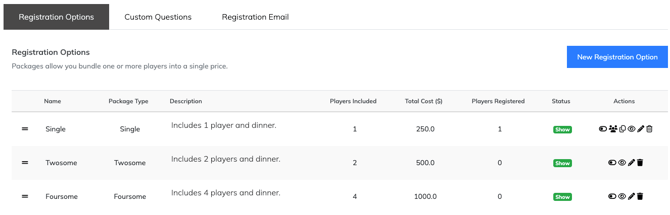
A Registration Package is a purchasable registration option that includes one or more players.
Common Registration Packages include:
- Single Golfer
- Twosome
- Foursome
- Early Bird Foursome
- VIP or invitation-only registration
Registration Packages are managed under:
Player Management > Registration Options
A package can define information such as:
| Setting | Purpose |
|---|---|
| Package Name | Identifies the registration option |
| Number of Players | Determines how many player spots are included |
| Package Cost | Sets the registration price |
| Package Description | Explains what players receive |
| Visibility | Determines whether the package appears publicly or is accessed through a private link |
| Player Contact Requirements | Can require additional player email addresses or phone numbers |
Registration Packages must include at least one player. For every player registration, the first player’s first name, last name, email address, and phone number are required. This applies whether the player is registered through a Registration Package or an Online Store product that includes players.
If you need to sell or collect registrations for something that does not require a player spot—such as merchandise, dinner tickets, volunteers, waitlists, raffle tickets, or sponsorships (even if they include players)—use the Online Store instead.
Registration Packages vs. Online Store products
Registration Packages and Online Store products can both result in players being added to the tournament, but they serve different purposes.
| Registration Package | Online Store product |
|---|---|
| Primarily used to register golfers | Primarily used to sell optional products, sponsorships, tickets, merchandise, and other items |
| Must include at least one player | Can include zero players |
| Examples include Single Golfer, Twosome, and Foursome | Examples include sponsorships, dinner tickets, mulligans, and merchandise |
| Managed under Player Management > Registration Options | Managed under Finances & Commerce > Online Store |
A Sponsorship Product can include complimentary player registrations without becoming a Registration Package.
For volunteers, dinner-only attendees, waitlists, or anyone else who should not occupy a golfer's spot in the tournament, use the Online Store instead of a Registration Package.
Opening Player Registration
Creating Registration Packages is only one part of making registration available.
Your tournament must also have available player capacity and at least one Payment Option enabled. A Payment Option is required even if your tournament only offers $0 Registration Packages and no payment will actually be collected.
Your Max Players setting controls the total number of player spots EventCaddy can accept.
You can review or change it under:
My Event > Event Setup & Settings
Once the tournament reaches Max Players, EventCaddy prevents additional player registrations.
Online Store products that include players can also become unavailable when there is not enough remaining player capacity.
Payment Options and Payment Gateways are managed separately under the tournament's finance and payment settings.
Public and private Registration Packages
Registration Packages do not have to appear publicly on your Tournament Website.
A package can be hidden from the public registration page and accessed through its unique registration link.
Private Registration Packages are useful for:
- discounted registrations;
- VIP registrations;
- invitation-only registrations;
- special groups; or
- other registration offers that should not be available to everyone.
The private link can be copied from the Registration Options page and shared directly with the intended players.
Free and discounted registration
EventCaddy PRO allows organizers to create Registration Packages with a cost of $0.
On the FREE version of EventCaddy, the minimum Registration Package price is $1.
For discounted registration, create a Registration Package at the special price and keep it hidden from the public registration page. You can then share its private registration link with the players who should receive that rate.
This approach can also be used for invitation-only registration because EventCaddy does not use coupon codes for Player Registration.
To display $0 registrations on your website, please contact our support team using the chat icon on the bottom right, or email us at support@eventcaddy.com to request this change be made to your event. Otherwise, $0 items (Registration Packages and Online Store products) are always hidden by default.
Early Bird pricing
You can offer Early Bird pricing by creating separate Registration Packages at different prices.
For example:
- Single Golfer – Early Bird
- Single Golfer – Regular
- Foursome – Early Bird
- Foursome – Regular
When your Early Bird period ends, hide the discounted packages and make your regular-priced packages visible.
This lets you change which pricing is available without modifying registrations that have already been completed.
Custom Questions
Custom Questions let you collect additional information from players during registration.
Common examples include:
- handicap;
- shirt size;
- dietary restrictions;
- allergies;
- emergency contact information; or
- other tournament-specific details.
Custom Questions are managed under:
Player Management > Registration Options > Questions
Custom Questions are global for the tournament. Every player is asked the same Custom Questions regardless of whether they are added through a Registration Package or an Online Store product that includes players.
Answers can be reviewed from Player Listing or exported to CSV.
Registration Confirmation Email
EventCaddy automatically sends a Registration Confirmation Email to each player with a valid email address after they are registered through a Registration Package or an Online Store product that includes players. For multi-player registrations, each player whose email address is provided receives the email. Players manually added by an organizer using Player Management > Player Listing > Register New Player do not receive the automatic Registration Confirmation Email.
The email is configured under:
Player Management > Registration Options > Registration Email
The same Registration Confirmation Email applies to players whether they were registered through a Registration Package or through an Online Store product that includes players.
This email is different from the Player Registration Email available under Communication Tools.
- The Registration Confirmation Email is automatically sent after a player registers.
- A Player Registration Email under Communication Tools is a promotional email used to encourage contacts who have not yet registered to sign up.
Keeping these two email types separate makes it easier to understand whether you are communicating with existing players or prospective players.
Managing registered players
Registered players can be viewed under:
Player Management > Player Listing
From Player Listing, organizers can search for players and review or update their information.
If a purchaser does not know every player's name when completing a multi-player registration, EventCaddy can create a Guest Player placeholder. The player information can then be updated later.
Purchasers can also update player information (name, email, phone number, and Custom Question answers) included in their registration through Manage Order on the Tournament Website using the email address and receipt number associated with the transaction.
Changes made to player information also carry through to Group Pairings.
Adding players manually
EventCaddy PRO organizers can manually add players from:
Player Management > Player Listing > Register New Player
PRO organizers can also create $0 Registration Packages when they need to register players without charging them.
Manual backend registration and $0 Registration Packages are not available on the FREE version.
On FREE tournaments, the minimum Registration Package cost is $1.
Where teams and groups are managed
Multi-player Registration Packages can register several golfers together, but EventCaddy does not use Player Registration for ongoing team or group management.
Players are organized into tournament groups later using Group Pairings under Scheduling.
Other EventCaddy areas related to Player Registration
Player Registration connects with several other parts of EventCaddy.
| Area | What it owns |
|---|---|
| Finances | Payment Options, Payment Gateways, transactions, refunds, and payment reporting |
| Online Store | Optional purchases, Sponsorship Products, and registrations that do not require a player |
| Communications | Promotional Player Registration Emails, Email Blasts, reminders, and contact management |
| Scheduling | Group Pairings and tournament-day player organization |
| Tournament Website | Public access to registration |
Use Player Registration articles for configuring and managing golfer registrations, and use these related Help Center areas for their specialized workflows.
Before you invite players
Before promoting your tournament registration, confirm that:
- your Registration Packages have the correct player counts and prices;
- packages that should be public are visible;
- private packages have the correct registration links;
- your tournament has the required payment setup;
- Max Players is set correctly;
- your Custom Questions are ready;
- your Registration Confirmation Email contains the information players should receive after registering; and
- you have previewed your Tournament Website and confirmed registration is working as expected.
Frequently Asked Questions
Can I use a Registration Package for a sponsorship?
Usually, no.
Sponsorships should normally be created as Sponsorship Products in the Online Store. A Sponsorship Product can include complimentary player registrations while still remaining an Online Store product.
Can I use Player Registration for volunteers or dinner-only attendees?
Use a Registration Package only when the person should occupy a player spot.
For volunteers, dinner-only registrations, waitlists, tickets, or other non-player registrations, use the Online Store.
Can I offer a private or discounted registration?
Yes. Create a Registration Package at the appropriate price, hide it from the public registration page, and share its direct registration link with the intended players.
Can I offer free player registration?
Yes, with EventCaddy PRO. PRO tournaments can create $0 Registration Packages.
The minimum Registration Package price on the FREE version is $1.
Can I manually add a player?
Manual player registration from Player Listing is available with EventCaddy PRO.
On the FREE version, players must register through a Registration Package with a minimum price of $1.
Are Custom Questions different for different Registration Packages?
No. Custom Questions apply to every player in the tournament.
They are asked whether a player is registered through a Registration Package or manually added through Player Listing > Register New Player as well as an Online Store product that includes players.
What's the difference between the Registration Confirmation Email and a Player Registration Email?
The Registration Confirmation Email is automatically sent to players after they register through a Registration Package or an Online Store product that includes players. It is not sent when an organizer manually registers a player from Player Listing.
Player Registration Emails under Communication Tools are promotional emails used to encourage contacts to register.
What happens when my tournament reaches Max Players?
EventCaddy prevents additional players from being registered once the tournament reaches its configured player capacity.
Online Store products that include players can also become unavailable if purchasing them would exceed the tournament's player limit.
Related Articles
- Creating and Managing Registration Packages
- Opening and Closing Player Registration
- Inviting Players with Private, Free, or Discounted Registration Links
- Creating Registration Questions and Viewing Answers
- Customizing the Registration Confirmation Email
- Managing Players and Registrations
- What Payment Options Can I Offer Players and Sponsors?
- Creating Online Store Products
- Setting Up Group Pairings