
Stripe and PayPal are Payment Gateways that connect your tournament to online payment processing.
Stripe powers Event Caddy's Pay by Credit Card option, while PayPal powers Pay by PayPal. You can connect either gateway or connect both to give purchasers a choice during normal Tournament Website checkout.
Important: A Payment Gateway is different from a Payment Option. The gateway processes the online payment; the Payment Option is what the purchaser chooses at checkout.
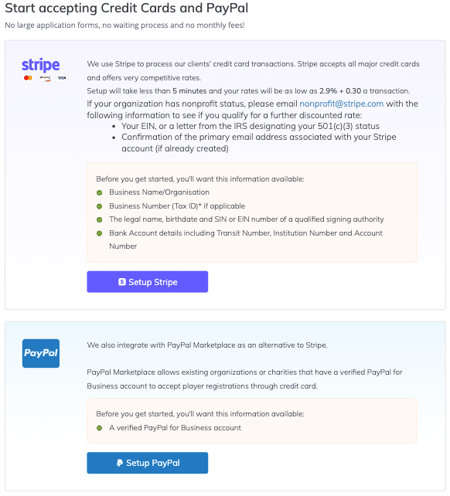
Connect Stripe
Stripe is used when purchasers choose Pay by Credit Card.
To connect Stripe:
- From the Admin Dashboard, go to My Event > Payment Details.
- Under Stripe, select Setup Stripe.
- Follow Stripe's onscreen instructions to create or connect the account and complete any required verification.
- Provide the bank account information Stripe will use for payouts.
- Return to Event Caddy when the setup process is complete.
Stripe may request organization details, identity or tax information, and bank account information as part of its verification process. The exact requirements depend on the Stripe account and location.
After Stripe is connected, enable Accept Credit Cards under My Event > Event Setup & Settings if you want Pay by Credit Card to appear during checkout.
Connect PayPal
PayPal is used when purchasers choose Pay by PayPal.
To connect PayPal:
- From the Admin Dashboard, go to My Event > Payment Details.
- Under PayPal, select Setup PayPal.
- Follow PayPal's onscreen instructions to connect the appropriate PayPal account.
- Return to Event Caddy when the setup process is complete.
After PayPal is connected, enable Accept Paypal under My Event > Event Setup & Settings if you want Pay by PayPal to appear during checkout.
Use Stripe and PayPal Together
Stripe and PayPal can both be connected to the same tournament.
When both corresponding Payment Options are enabled, purchasers can choose between:
- Pay by Credit Card, processed through Stripe
- Pay by PayPal, processed through PayPal
Connecting a gateway does not automatically mean it must be offered at checkout. Organizers control the available Payment Options separately under My Event > Event Setup & Settings.
Where Stripe and PayPal Can Be Used
For normal Tournament Website checkout, Stripe and PayPal can be used for eligible Player Registration, Online Store, sponsorship, and donation transactions.
There are two important exceptions:
- Manage Order: A purchaser paying an existing unpaid order through Manage Order can pay by credit card through Stripe. PayPal is not available through Manage Order.
- Auctions: Online credit-card payment for Auction winning bids requires Stripe. PayPal is not supported for Auction payments.
Payment Gateways Belong to the Tournament
Stripe and PayPal connections are associated with a tournament.
A new tournament normally requires its Payment Gateways to be connected for that tournament.
When a tournament is cloned:
- The Stripe connection is currently carried over automatically.
- The PayPal connection is not carried over and must be connected for the cloned tournament.
Payouts and Access to Your Funds
Payments processed through Stripe or PayPal are deposited into the organizer's connected processor account. Event Caddy does not hold tournament proceeds.
This means organizers can receive and withdraw funds throughout the registration and sales period according to the policies and payout settings of their Stripe or PayPal account.
Stripe and PayPal may support automatic or manual payout schedules depending on the processor, account, and country. Payout timing, frequency, bank-account settings, and payout history are managed directly through Stripe or PayPal.
For processor-specific payout questions, use the Stripe or PayPal account and support resources associated with your gateway.
Processing Fees
Stripe and PayPal charge their own payment-processing fees.
A common processing rate is approximately 2.9% + $0.30 per transaction, but the actual rate can vary. Nonprofit organizations may qualify for reduced rates, while some card types, international transactions, countries, or account arrangements may have different rates.
These processor fees are separate from Event Caddy fees and any Custom Fee configured by the tournament.
For a complete explanation of Event Caddy fees, processor fees, and Custom Fees, see the Understanding Fees & Rates in Event Caddy guide.
Supported Currencies
Event Caddy currently supports these tournament currencies:
- USD — US Dollar
- CAD — Canadian Dollar
- AUD — Australian Dollar
- GBP — Pound Sterling
- EUR — Euro
- NZD — New Zealand Dollar
The tournament currency is configured in Event Settings.
Payment-processor availability can vary by country. If you are outside Event Caddy's typical supported markets or are unsure whether Stripe can process payments in your country, confirm availability with Stripe before opening online payments.
Payment Security
Stripe and PayPal are PCI-compliant payment processors.
PCI DSS is the payment-card security standard used by organizations that process, store, or transmit cardholder information. Stripe and PayPal handle the processor-side card-payment infrastructure used by Event Caddy's online Payment Options.
Changing or Disconnecting a Payment Gateway
Resetting or disconnecting Stripe or PayPal is not a normal organizer workflow.
If you need to change the Stripe or PayPal account connected to a tournament, contact Event Caddy Support for assistance.
Historical Event Caddy transactions remain separate from the connection to the processor account, so changing a gateway connection does not remove the existing Event Caddy transaction records.
Frequently Asked Questions
Can I connect both Stripe and PayPal?
Yes. Both gateways can be connected to the same tournament and both Payment Options can be enabled at the same time.
Purchasers can then choose Pay by Credit Card or Pay by PayPal during normal checkout.
Do I need Stripe or PayPal to use Event Caddy FREE?
FREE tournaments can accept online payments through Stripe and/or PayPal.
PRO and ELITE also support Stripe and PayPal and add manual Cash and Cheque Payment Options.
Does Event Caddy hold my tournament funds?
No. Online proceeds are processed into the tournament organizer's connected Stripe or PayPal account.
Event Caddy does not hold all tournament revenue until the tournament has taken place.
Can I control when Stripe or PayPal sends money to my bank account?
Payout settings are managed through Stripe or PayPal rather than Event Caddy.
Depending on your processor account and country, the gateway may offer automatic or manual payouts and different payout schedules.
How much does Stripe or PayPal charge?
Approximately 2.9% + $0.30 per transaction is the most common processing rate for Event Caddy customers, but it is not guaranteed for every transaction or account.
Rates may differ for nonprofits, certain cards, international transactions, or other processor-specific circumstances.
Can nonprofits receive lower processing rates?
Possibly. Stripe and PayPal may offer reduced processing rates to qualifying nonprofit organizations.
Eligibility and current rates are determined by Stripe or PayPal, so confirm the available nonprofit program directly with the processor.
Can PayPal be used to pay an Auction winner's balance?
No. Auction online payments currently require Stripe.
PayPal can still be used as a Payment Gateway for normal Tournament Website checkout.
Is PayPal available through Manage Order?
No. When a purchaser returns to an existing unpaid transaction through Manage Order, online payment is currently available through Stripe only.
Related Articles
- Choosing and Configuring Payment Options
- Understanding Fees & Rates in Event Caddy
- Managing Transaction History and Receipts