
A private Registration Package lets you offer a Registration Package to selected golfers without displaying it with the public registration options on your Tournament Website.
This is useful when you want to offer:
- a discounted rate;
- free or complimentary registration;
- VIP registration;
- invitation-only registration;
- a special rate for a specific group; or
- another Registration Package that should only be available to selected golfers.
Players access the package using its unique registration link.
Important: A private Registration Package is hidden from the public Tournament Website, but its link is not restricted to a specific person. Anyone who receives the link can access the package.
Before you begin
Private registration uses a standard Registration Package.
Before sharing the link:
- create the Registration Package with the correct number of players and price;
- confirm that at least one Payment Option is enabled;
- make sure your tournament has available player capacity; and
- configure the package as private.
A Payment Option is required even when the Registration Package costs $0 and no funds will be collected.
For complete Registration Package setup instructions, see Creating and Managing Registration Packages.
Create a private Registration Package
- Go to Player Management > Registration Options.
- Click New Registration Option.
- Create the Registration Package with the appropriate player count, Package Name, Package Cost, and description.
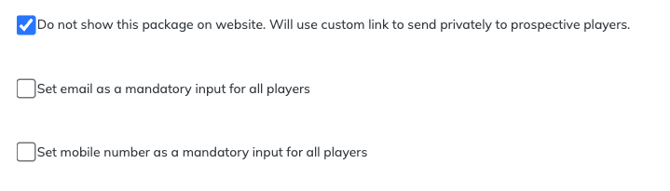
- Enable: Do not show this package on website. Will use custom link to send privately to prospective players
- Complete the remaining Registration Package settings.
- Click Create Registration Package.
The Registration Package will remain hidden from the public registration options but can still be accessed using its private registration link.
Copy and share the private registration link
After creating the Registration Package:
- Go to Player Management > Registration Options.
- Locate the Registration Package you want to share.
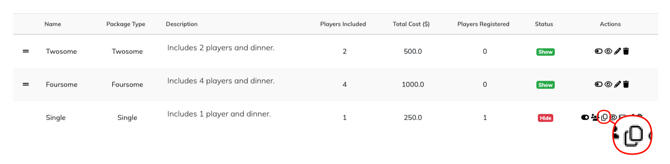
- In the Actions column, locate the mail icon. Hovering over the icon displays Invite Players.
- Select Invite Players.
- Click Copy Link to copy the Registration Package URL.
- Paste the link into the email, text message, or other communication you send to the intended golfers.
Anyone who opens the link can access that specific Registration Package without the package appearing with your public registration options.
Offer discounted registration
EventCaddy does not use coupon or discount codes for Player Registration.
Instead, create a separate Registration Package at the discounted price, keep it private, and share its unique registration link with the golfers who should receive the discount.
For example, if your regular Foursome costs $600 but selected golfers should pay $500:
- Leave the existing $600 Foursome unchanged.
- Create a new Registration Package such as Discounted Foursome.
- Set its Package Cost to $500.
- Keep the discounted package private.
- Copy its registration link.
- Share the link only with the intended golfers.
Important: Do not change the price of an existing Registration Package after it has been purchased. Changing the price after completed registrations can cause financial reporting and transaction count issues. Create a separate Registration Package whenever you need to offer a different price.
Offer free registration
$0 Registration Packages are available with EventCaddy PRO.
To offer selected golfers free registration:
- Create a new Registration Package under Player Management > Registration Options.
- Enter the appropriate number of players.
- Set the Package Cost to $0.
- Keep the package private.
- Save the Registration Package.
- Use Invite Players > Copy Link to copy its private registration link.
- Send the link to the golfers who should register for free.
On the FREE version of EventCaddy, the minimum Registration Package price is $1.
At least one Payment Option must still be enabled for a $0 Registration Package, even though no payment will actually be collected.
Display a $0 Registration Package publicly
By default, $0 items—including Registration Packages and Online Store products—are hidden from the public Tournament Website.
If you want a $0 Registration Package to appear publicly:
- Make sure the Registration Package is not intentionally configured as private.
- Contact EventCaddy Support using the chat icon in the bottom-right corner or email support@eventcaddy.com.
- Ask to have $0 items enabled for public display on your tournament.
You do not need public $0-item display enabled when you are sharing a $0 Registration Package through its private registration link.
Understand how private links work
A private Registration Package is hidden, not individually secured.
This means:
- it does not appear with your public Registration Packages;
- anyone with its direct link can access it;
- the link can be sent by email, text message, or another communication method; and
- a recipient can forward the link to someone else.
Private links are therefore best used when you trust the recipients to share them appropriately.
If you need to prevent all additional players from registering, use your tournament's Max Players setting rather than relying on package visibility. See Opening and Closing Player Registration.
Private registration vs. public registration
| Public Registration Package | Private Registration Package |
|---|---|
| Appears with registration options on the Tournament Website | Does not appear with public registration options |
| Available to visitors who access registration normally | Accessed using its unique direct link |
| Best for regular tournament registration | Best for special, discounted, VIP, or invitation-only registration |
| No special link is required | Organizer shares the private link with selected golfers |
The registration process itself is otherwise based on the Registration Package you created.
Frequently Asked Questions
Does EventCaddy support coupon codes for Player Registration?
No.
To offer a discount, create a separate Registration Package at the discounted price, hide it from the public Tournament Website, and share its private registration link with the eligible golfers.
Do not change the price of a Registration Package that has already been purchased.
Can I create a free Registration Package?
Yes, with EventCaddy PRO.
PRO tournaments can create $0 Registration Packages. On the FREE version, the minimum Registration Package price is $1.
Do I still need a Payment Option for a free Registration Package?
Yes.
At least one Payment Option must be enabled even when the Registration Package costs $0 and no money will actually be collected.
Does a $0 Registration Package have to appear publicly?
No.
You can keep a $0 Registration Package private and share its unique registration link directly with selected golfers.
If you want a $0 Registration Package displayed publicly, contact EventCaddy Support to have $0 items enabled for your tournament.
Can someone share a private Registration Package link with another person?
Yes.
The link is not tied to a particular recipient. Anyone who has the link can access the Registration Package.
If you send a private or complimentary registration link, make it clear to recipients whether they are permitted to share it.
Can golfers still use the link if the Registration Package is hidden?
Yes.
Hiding a Registration Package from the public Tournament Website does not disable its private registration link.
Can I use this process for a VIP or invitation-only Registration Package?
Yes.
The same private-link process can be used for discounted, complimentary, VIP, invitation-only, or other special Registration Packages.