
The Online Store allows you to sell products and optional purchases through your Tournament Website.
You can use it for sponsorships, merchandise, mulligans, raffle tickets, dinner tickets, contests, donations, non-player registrations, and other items related to your tournament.
The Online Store is available with Event Caddy PRO.
What can I sell through the Online Store?
Online Store products are flexible. The type of product you create depends on what your tournament needs.
| Common use | Examples |
|---|---|
| Sponsorships | Hole Sponsor, Gold Sponsor, Cart Sponsor, Dinner Sponsor |
| Tournament extras | Mulligans, raffle tickets, contest entries, 50/50 tickets |
| Merchandise | Shirts, hats, golf gloves, or other apparel |
| Meals and admission | Dinner tickets, banquet tickets, guest tickets |
| Non-player options | Volunteer registration, waitlists, or other sign-ups that do not require a golfer |
| Fundraising | Donations or other optional contributions |
Each item you sell is created as an Online Store product with its own name, price, description, quantity, category, and purchase settings.
Online Store products vs. Registration Packages
Online Store products and Registration Packages serve different purposes.
| Use | Best for | Player requirement |
|---|---|---|
| Registration Package | Registering golfers or teams for the tournament | Must include at least one player |
| Online Store product | Sponsorships, extras, merchandise, tickets, or non-player options | Does not require players |
| Online Store product with included players | Sponsorships or packages that also include golf | Can include player registrations when configured |
For example, a foursome that registers four golfers would normally be a Registration Package.
A dinner-only ticket, volunteer registration, or raffle ticket would normally be an Online Store product because it does not require a golfer.
A sponsorship that includes four golfers should normally be sold through the Online Store, with player registrations included in the product.
What makes up the Online Store?
| Online Store area | Purpose |
|---|---|
| Product Categories | Organize related products in your Online Store |
| Online Store products | Define what is being sold, its price, availability, and purchase settings |
| Product Email Templates | Send an optional customized email after a specific product is purchased |
| Donation Email Template | Send a customized email after someone donates through the Donate button |
| Consumer Reports | Show purchases and transaction details for a specific product |
Product Categories should normally be created before adding products. Product Email Templates are optional and can be created before or after the product.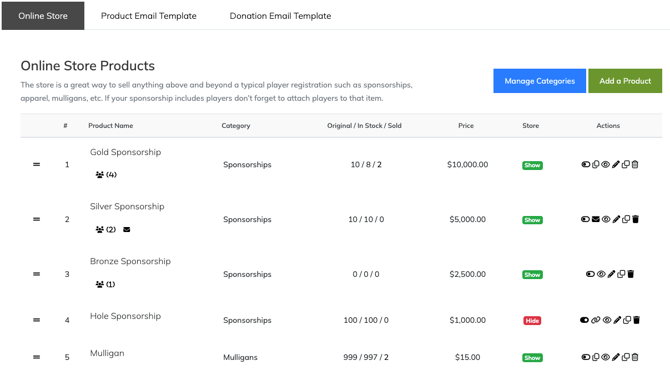
Before you begin
Before customers can purchase from your Online Store, confirm that:
- your tournament has Event Caddy PRO;
- at least one payment option is enabled;
- Stripe or PayPal is connected if you plan to accept those online payment methods; and
- the products you want to sell have been created and made available.
Event Caddy PRO also allows you to accept cash or check payments without connecting an online payment gateway.
Important: Online Store products will not be available for purchase on your Tournament Website until at least one payment option is enabled.
Payment options are managed under My Event > Event Setup & Settings. Stripe and PayPal connections are managed under My Event > Payment Details.
Recommended Online Store setup order
- Confirm that the tournament has Event Caddy PRO.
- Enable the payment options you want to accept.
- Create Product Categories to organize what you plan to sell.
- Create any optional Product Email Templates.
- Add the products you want to sell.
- Review each product’s price, quantity, visibility, and purchase settings.
- Preview the Online Store on your Tournament Website.
This setup order keeps products organized and reduces the need to edit each product later.
How the Online Store connects with other Event Caddy areas
The Online Store works with several other parts of Event Caddy.
| Event Caddy area | Connection to the Online Store |
|---|---|
| Tournament Website | Displays products so customers can view and purchase them |
| Transaction History | Records individual Online Store purchase transactions |
| Event Finances | Summarizes Online Store revenue in the tournament financial report |
| Sponsors | Displays sponsor recognition when a sponsorship purchaser uploads a logo |
| Player Registration | Receives players included with an Online Store product |
| Event Settings | Controls payment options, fees, maximum players, and website buttons |
If a product includes player registrations, those players count toward the tournament’s maximum player capacity.
When the maximum number of players has been reached, products that include players may no longer appear as available because Event Caddy prevents the tournament from exceeding its player limit.
Viewing purchases and reports
Online Store purchase transactions can be reviewed under Finances & Commerce > Transaction History. For the complete transaction workflow, see Managing Transaction History and Receipts.
To see purchases for one specific Online Store product, go to Finances & Commerce > Online Store and open the product’s Consumer Report.
The Consumer Report allows you to review the product’s transactions and export the information for reporting.
Frequently Asked Questions
Can an Online Store product include players?
Yes. An Online Store product can include player registrations.
This is commonly used for sponsorships that include golfers, but included players can be added to other types of Online Store products when appropriate.
Can I use the Online Store for volunteers or a waitlist?
Yes. The Online Store can be used for registrations or sign-ups that do not require a golfer.
Examples include volunteer registration, dinner-only tickets, guest admission, and waitlists.
Why are my Online Store products not available?
First, confirm that at least one payment option is enabled.
Also check that the product is visible, has quantity available, and has not been marked sold out.
If the product includes players, check whether the tournament has reached its maximum player capacity.
Can I see who purchased a particular product?
Yes. Open the Consumer Report for that product under Finances & Commerce > Online Store.
Can I sell sponsorships through the Online Store?
Yes. Sponsorships should normally be sold as Online Store products rather than Registration Packages.
Select Is this product a sponsorship? when creating the product if sponsor information should be collected during checkout.
Can I use the Online Store with Event Caddy Free?
No. The Online Store is available with Event Caddy PRO.