
Several different fees can appear when payments are made through Event Caddy. They are not all charged by Event Caddy, and they do not all go to the same place.
The main fee types are:
- the Event Caddy Convenience Fee, charged per player for eligible online registrations;
- a Custom Fee, optionally configured by the tournament organizer;
- a payment-processing fee, charged by Stripe or PayPal; and
- Auction-specific fees when a winning Auction Item is paid by credit card.
Understanding the difference makes it easier to price your tournament and understand Transaction History and Event Finances.
Fee Types at a Glance
| Fee | Who receives it | How it works |
|---|---|---|
| Event Caddy Convenience Fee | Event Caddy | Per-player fee added when players are registered using Stripe or PayPal |
| Custom Fee | Tournament organizer | Optional percentage configured by the organizer and added to qualifying transactions |
| Payment-processing / Merchant Fee | Stripe or PayPal | Processor fee deducted from payments processed through that gateway |
| Auction fee | Event Caddy | 2.5% of an Auction credit-card winning bid, capped at $50 per Auction Item |
These fees are separate from one another. More than one may apply to the same transaction.
Event Caddy Convenience Fee
The Event Caddy Convenience Fee is a per-player fee that applies when players are registered using Stripe or PayPal.
It applies on FREE, PRO, and ELITE tournaments.
The fee applies to players whether they are registered through:
- a Registration Package; or
- a Store Product or Sponsorship Product that includes players.
The purchaser normally pays this fee in addition to the registration or product amount. Event Caddy receives the Convenience Fee; it does not reduce the organizer's registration price.
You may also see this fee referred to in Event Caddy data as:
- EC Conv. Fee
- Player Fee
These refer to the same Event Caddy per-player fee.
Convenience Fee by Tournament Currency
| Tournament currency | Convenience Fee per player |
|---|---|
| USD | $4.00 |
| CAD | $4.00 |
| AUD | $4.50 |
| GBP | £2.50 |
| EUR | €3.00 |
| NZD | $5.00 |
Cash, Cheque, and renamed manual payment methods do not collect the Event Caddy Convenience Fee through online checkout.
Can the organizer absorb the Convenience Fee?
Yes. By default, the purchaser pays the Event Caddy Convenience Fee.
If you would rather absorb the player fees instead of adding them to the purchaser's checkout total, contact Event Caddy Support. Event Caddy can configure the tournament accordingly and invoice the organizer for the applicable player fees.
Payment-Processing Fees
Stripe and PayPal charge their own fees for processing payments.
A common rate for Event Caddy customers is approximately 2.9% + $0.30 per transaction, but the actual rate is determined by the Payment Gateway and may vary.
For example, rates may differ for:
- qualifying nonprofit organizations;
- certain card types;
- international payments; or
- processor-specific account arrangements.
Payment-processing fees are separate from the Event Caddy Convenience Fee and any Custom Fee configured by the organizer.
For current processor-specific rates and eligibility, refer to your Stripe or PayPal account.
Merchant Fee and the Event Caddy Processing-Fee Estimate
In Transaction History exports, you may see a Merchant Fee.
Event Caddy currently estimates this amount for Stripe transactions using the common formula:
2.9% of the transaction amount + $0.30
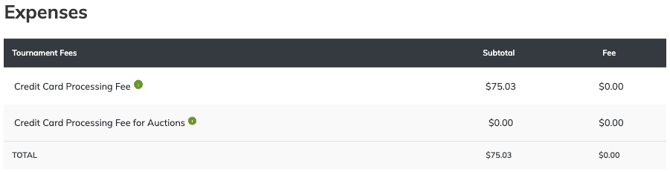
Event Caddy also uses this calculation to estimate the Credit Card Processing Fee shown under Expenses in Finances & Commerce > Event Finances.
This is an estimate generated by Event Caddy. It does not come directly from Stripe and therefore may not exactly match the fee Stripe actually charged.
PayPal processing fees are not currently included in the Event Finances processing-fee estimate.
Important: Use Stripe or PayPal as the source of truth when you need the actual processor fee charged to a payment. Event Caddy's Credit Card Processing Fee is a reporting estimate.
Configure a Custom Fee
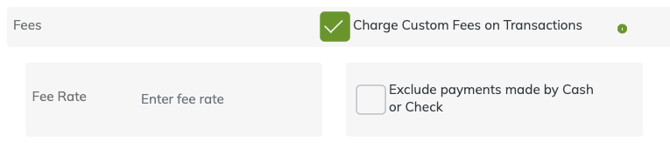
A Custom Fee is an optional percentage configured by the tournament organizer. Unlike the Event Caddy Convenience Fee or processor fee, the Custom Fee is collected for the organizer.
To configure it:
- Go to My Event > Event Setup & Settings.
- Scroll to the Fees section.
- Enable Fee.
- Enter the percentage under Fee Rate.
- If you do not want the Custom Fee applied to Cash or Cheque payments, enable Exclude payments made by Cash or Check.
- Select Save Changes.
The Fee Rate is always percentage-based.
The Custom Fee is calculated against the qualifying registration or product amount before the Event Caddy Convenience Fee is added.
For example, with:
- a $100 single-player Registration Package;
- a 1% Custom Fee; and
- a $4 Event Caddy Convenience Fee;
the checkout total before any processor-side deductions would be:
- Registration Package: $100
- Custom Fee: $1
- Event Caddy Convenience Fee: $4
- Total: $105
The payment processor may then deduct its own processing fee from the payment before depositing funds into the organizer's processor account.
Where the Custom Fee Applies
The Custom Fee does not automatically apply to every type of sale.
| Transaction type | Custom Fee behavior |
|---|---|
| Registration Packages | Applies automatically when the tournament Fee is enabled |
| Store Products | Applies only when Enable Fee's is enabled for that Store Product |
| Sponsorship Products | Same Store Product rule — Enable Fee's must be enabled |
| Dedicated Donate workflow | Custom Fee does not apply |
| Cash / Cheque | Applies unless Exclude payments made by Cash or Check is enabled |
| Auction credit-card payments | Can include the tournament Custom Fee as part of the Auction payment workflow |
When creating a Store Product, use its Enable Fee's option if that product should receive the tournament's configured Custom Fee.
Important: The Fee Percentage fields available when manually adding Other Revenue or Other Expenses in Event Finances are different. Those fields perform a reporting calculation only. They do not configure or charge the tournament's Custom Fee.
Auction Fees
Auctions use additional fee rules because Auction winning-bid payments are a separate workflow.
For a winning Auction Item paid by credit card through Event Caddy:
- Stripe charges its payment-processing fee, commonly approximately 2.9% + $0.30 per transaction.
- Event Caddy charges an Auction fee of 2.5% of the winning bid, capped at $50 per Auction Item.
- A tournament Custom Fee may also be included when configured.
The Event Caddy Auction fee applies only when the winning bid is paid by credit card through the Event Caddy Auction payment workflow. It does not apply when the organizer collects the Auction payment manually or offline.
Auction payment and fee details remain owned by the Auction workflow. See Managing Auction Winners, Payments, and Reporting for the complete process.
Where Fees Appear
Different fees appear in different areas of Event Caddy.
Transaction History exports
Transaction exports can include fields such as:
- Custom Fee
- EC Conv. Fee
- Merchant Fee
- Player Fee
EC Conv. Fee and Player Fee refer to the Event Caddy per-player Convenience Fee.
Custom Fee is the organizer-configured fee.
Merchant Fee is Event Caddy's estimated processor fee where supported.
Event Finances
Under Finances & Commerce > Event Finances, the Expenses section can include estimated processing fees such as:
- Credit Card Processing Fee
- Credit Card Processing Fee for Auctions
These are financial-reporting calculations and should not be treated as a direct statement from Stripe of the exact processor fee charged.
Frequently Asked Questions
Is the Event Caddy Convenience Fee the same as the Stripe or PayPal processing fee?
No.
The Event Caddy Convenience Fee is a per-player Event Caddy fee.
Stripe and PayPal separately charge payment-processing fees for transactions handled through their platforms.
Is Player Fee the same thing as the Event Caddy Convenience Fee?
Yes.
Depending on where you are viewing the data, the Event Caddy Convenience Fee may appear as Player Fee or EC Conv. Fee.
Does the Convenience Fee apply to players included in a Store Product?
Yes.
The Convenience Fee is based on the players being registered, not whether the player spot came from a Registration Package or a Store Product.
Does the Event Caddy Convenience Fee apply to FREE tournaments?
Yes.
The per-player Convenience Fee applies to eligible Stripe and PayPal player registrations on FREE, PRO, and ELITE.
Can I charge my own fee?
Yes.
Enable the tournament Fee under My Event > Event Setup & Settings and enter the percentage under Fee Rate.
This Custom Fee is collected for the tournament organizer.
Can I exclude Cash and Cheque from my Custom Fee?
Yes.
Enable Exclude payments made by Cash or Check in the Fees settings.
This also applies when Cash or Cheque has been renamed for another manual payment method, such as e-Transfer or ACH.
Why isn't my Custom Fee appearing on an Online Store product?
Enabling the tournament Fee is not enough for Store Products.
The individual Store Product must also have Enable Fee's selected.
Does the Custom Fee apply to donations?
Not to donations completed through the dedicated Tournament Website Donate workflow.
A Store Product used for fundraising remains a Store Product and follows the Store Product Enable Fee's setting.
Is the Credit Card Processing Fee in Event Finances exact?
No.
Event Caddy currently estimates Stripe processing using approximately 2.9% + $0.30 per transaction. Actual Stripe fees can vary.
PayPal processing fees are not currently included in this Event Finances estimate.
Can nonprofits receive lower Stripe or PayPal rates?
Possibly.
Stripe and PayPal determine their own nonprofit eligibility and rates. Check with the Payment Gateway for current requirements and pricing.
Does Event Caddy charge the Auction fee on an offline Auction payment?
No.
The 2.5% Event Caddy Auction fee, capped at $50 per Auction Item, applies to winning bids paid by credit card through the Event Caddy Auction payment workflow.