
A Custom Domain lets you use your own website address for your Tournament Website instead of the standard Event Caddy URL.
For example, visitors could use yourtournamentname.com, with pages such as yourtournamentname.com/register and yourtournamentname.com/store.
Custom Domains are available with PRO and ELITE. You can purchase a domain through Event Caddy, connect a domain you already own, or move an existing Event Caddy Custom Domain from a previous tournament.
Important — Event Caddy-managed domains cost $30 USD per year on PRO. ELITE includes an applicable domain. If you own and renew the domain with another registrar, Event Caddy charges no annual domain fee.
Table of Contents
- Open the Custom Domain Settings
- Choose How to Use a Custom Domain
- Buy a Domain Through Event Caddy
- Connect a Domain You Already Own
- Move a Domain from a Previous Tournament
- Renew an Event Caddy-Managed Domain
- Wait for Your Domain to Become Active
- Frequently Asked Questions
Open the Custom Domain Settings
You can access the same underlying Custom Domain feature in either of two ways.
From the Admin Dashboard:
- Select Event Website.
- Select Custom Domain Name.
Or, from the Inline Website Editor (Beta):
- Open Event Website > Inline Website Editor.
- Select Enhancements > Custom domain.
Both routes manage the Custom Domain for the same Tournament Website.
Choose How to Use a Custom Domain
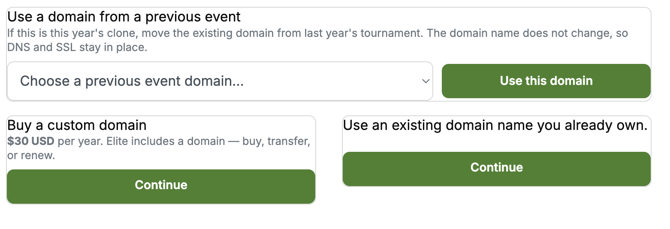
Event Caddy currently supports three common Custom Domain workflows.
- Buy a custom domain — You want Event Caddy to purchase and manage a new domain for the tournament.
- Use an existing domain name you already own — You already own the domain through a provider such as GoDaddy and want to point it to Event Caddy.
- Use a domain from a previous event — An Event Caddy Custom Domain is already attached to one of your previous tournaments and you want to move it to the current tournament.
The exact options displayed depend on your tournament and whether Event Caddy finds an eligible domain attached to one of your previous tournaments.
Buy a Domain Through Event Caddy
Choose Buy a custom domain when you want Event Caddy to purchase and manage the domain for you.
For PRO tournaments, the current price is $30 USD per year.
ELITE includes a domain, including the applicable purchase, move/transfer, or renewal.
- Open the Custom Domain settings.
- Under Buy a custom domain, select Continue.
- Follow the prompts to search for and purchase the domain.
- Complete the domain setup.
Once setup is complete, Event Caddy handles the domain connection, DNS configuration, and SSL required for the Tournament Website.
Event Caddy-Managed Domain Pricing
- FREE — Not available
- PRO — $30 USD per year
- ELITE — Included
On PRO, this annual price covers a domain Event Caddy purchases, holds, or renews on your behalf.
Connect a Domain You Already Own
If your organization owns a domain through a registrar such as GoDaddy or Namecheap, select Continue under Use an existing domain name you already own.
Event Caddy does not charge an additional annual domain fee for a domain you continue to own and maintain through your own registrar.
You remain responsible for:
- ownership of the domain
- renewal charges from your registrar
- access to the domain’s DNS settings
Enter Your Domain
You can provide the domain with or without www.
For example:
yourtournamentname.com
or:
www.yourtournamentname.com
Event Caddy completes the final website routing and SSL configuration as part of the connection process.
Configure DNS
At your DNS provider, add the following CNAME record:
- Type — CNAME
- Host / Name —
www - Points to / Target —
app.eventcaddy.com
Your DNS provider may use slightly different field names.
We recommend setting up URL forwarding with your domain provider from the bare domain (@) to the www address. For example, forward yourtournamentname.com to www.yourtournamentname.com.
Note: Because you continue to own an externally registered domain, you must continue renewing it with your registrar. Event Caddy does not collect the $30 annual Event Caddy-managed domain fee for this setup.
Move a Domain from a Previous Tournament

You can move an eligible Custom Domain from a previous tournament to the current tournament. This works for domains managed by Event Caddy and domains you own through another registrar.
This is especially useful when cloning or creating a new tournament for the next year while keeping the same public domain.
When Event Caddy detects an eligible previous domain, the Custom Domain screen displays Use a domain from a previous event.
- Open the current tournament.
- Go to the Custom Domain settings.
- Under Use a domain from a previous event, open Choose a previous event domain...
- Select the domain you want to move.
- Select Use this domain.
The domain is transferred to the current tournament.
Because the domain name itself does not change, the existing DNS and SSL stay in place.
Important: Moving the domain changes which Tournament Website it points to. Use this option when the previous tournament no longer needs to be the active destination for that domain.
If the expected domain does not appear or the move does not complete correctly, contact Event Caddy Support.
Renew an Event Caddy-Managed Domain
Domains purchased and managed through Event Caddy must be renewed to continue pointing to the Tournament Website.
For PRO tournaments, renewal is currently $30 USD per year. ELITE includes the applicable domain renewal.
Renewal Reminders
Event Caddy sends domain-renewal reminder emails approximately:
- 2 months before expiration
- 1 month before expiration
- 1 week before expiration
When the expiration date is within approximately two months, organizers can also see a domain-expiration reminder when they sign in to the tournament.
Renew from the Tournament
You can renew the domain yourself.
- Open the tournament that currently has the domain.
- Go to Event Website > Custom Domain Name, or open Enhancements > Custom domain in the Inline Website Editor.
- Locate the current domain and its expiration date.
- Select Renew domain.
- Complete the renewal checkout if payment is required.
The renewal screen shows the domain, expiration date, renewal price, and payment form.
Renewing the same domain keeps the existing DNS and SSL configuration in place.
If the domain has already expired, follow the repurchase option if it appears in the tournament, or contact Event Caddy Support.

If you have trouble completing a renewal, contact Event Caddy Support.
Wait for Your Domain to Become Active
Custom Domain activation is not always immediate.
Allow approximately 60 minutes after completing the purchase or DNS setup for the domain to become active.
While DNS is becoming active, you can continue working on the Tournament Website through its normal Event Caddy address.
If the Custom Domain still is not working after a few hours, contact Event Caddy Support.
DNS changes made through an outside registrar can sometimes take additional time to propagate across the internet.
Frequently Asked Questions
How much does a Custom Domain cost?
Custom Domains are available with PRO and ELITE.
For PRO, an Event Caddy-managed domain costs $30 USD per year.
ELITE includes a domain for the applicable purchase, move/transfer, or renewal.
If you already own your domain through another registrar and maintain it yourself, Event Caddy does not charge the $30 annual domain-management fee.
Do I have to buy my domain through Event Caddy?
No.
You can either purchase a domain through Event Caddy or connect a domain you already own through another registrar.
Do I have to pay Event Caddy $30 per year if I already own my domain through GoDaddy?
No.
If you continue owning and renewing the domain through GoDaddy or another registrar, Event Caddy does not charge an additional annual domain fee.
You are still responsible for any fees charged by your registrar.
Can I reuse the same domain for next year's tournament?
Yes.
If the domain is attached to a previous tournament, open the Custom Domain settings for the current tournament. You can reuse an eligible domain whether you manage it through your own registrar or through Event Caddy.
Select the previous domain and choose Use this domain to move it to the current tournament.
Do I need to change DNS when moving my Custom Domain to a new tournament?
Normally, no.
When using Use a domain from a previous event, the domain name does not change, so the existing DNS and SSL stay in place.
Can I enter my domain with or without www?
Yes.
You can provide the domain with or without www. Event Caddy completes the final routing as part of the Custom Domain setup.
How long does a Custom Domain take to start working?
Allow approximately 60 minutes after purchase or DNS setup.
If it still is not working after a few hours, contact Event Caddy Support.
How will I know when my Event Caddy-managed domain needs to be renewed?
Event Caddy sends renewal reminder emails approximately two months, one month, and one week before expiration.
A renewal reminder also appears in the tournament as the expiration date approaches.
Can I renew my Custom Domain myself?
Yes.
Open the tournament currently using the domain and use the Renew domain option from the Custom Domain settings.
Can I change my normal Event Caddy website URL instead of buying a Custom Domain?
The standard Event Caddy-hosted Tournament Website URL is managed separately from Custom Domains.
If you need the standard Event Caddy URL changed, contact Event Caddy Support.